To track AI referral traffic in GA4, create a Custom Channel Group in Admin under Data display, add a channel rule matching Session source against a regex for AI domains (such as chatgpt.com, perplexity.ai, gemini.google.com, claude.ai, and copilot.microsoft.com), reorder that channel above the default Referral rule, and remember that Google AI Overviews clicks appear inside Organic Search while zero-click brand mentions are not captured by GA4.
1. What GA4 Captures vs. What It Misses
Google Analytics 4 only records sessions that end in a clickable visit with an intact referrer header or UTM parameter. In AI search, most buyer influence happens before any click occurs.
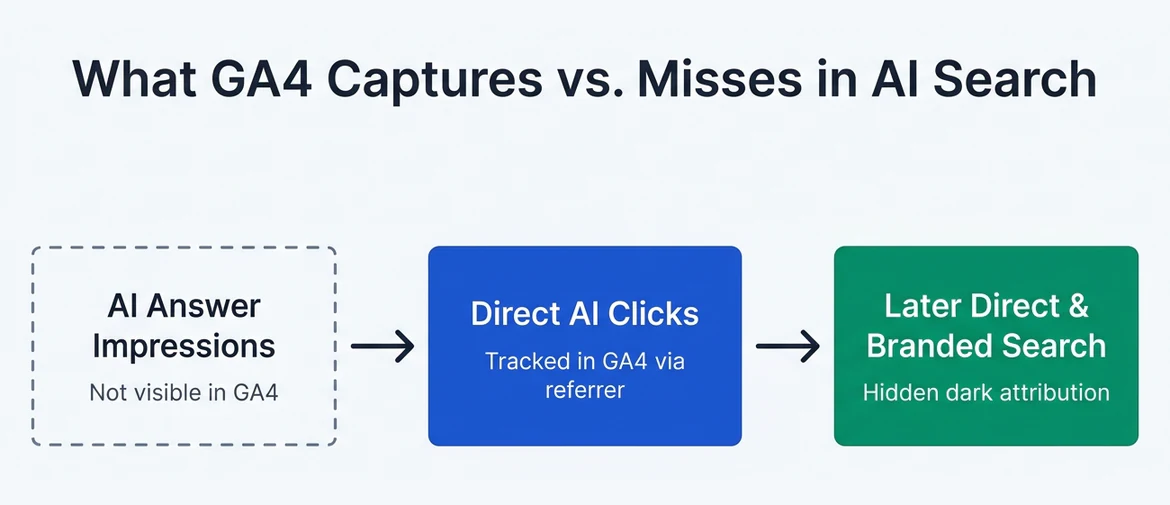
For example, a buyer can ask ChatGPT for CRM recommendations, read your brand name in the shortlist, open a new browser tab, and type your domain directly. GA4 classifies that visit as Direct or Organic Search, not AI referral traffic. Pair GA4 click tracking with prompt-level brand monitoring so you do not undercount AI-assisted pipeline.
2. Verified Session Source Regex for Major AI Platforms
Most standalone AI answer engines pass their domain as the session referrer (and ChatGPT often appends utm_source=chatgpt.com on outbound citation links). Before building a channel group, test which AI hostnames already appear in your property under Reports → Acquisition → Traffic acquisition when switched to Session source.
This RE2-compatible pattern matches root domains and subdomains without accidentally catching unrelated marketing domains that merely contain the letters "ai".
3. Creating and Reordering Your GA4 Custom Channel Group
Standard GA4 channel grouping drops ChatGPT and Perplexity visits into Referral unless your property already has Google's newer native channel rules enabled, and even then custom grouping gives your team exact control over which AI engines are included.
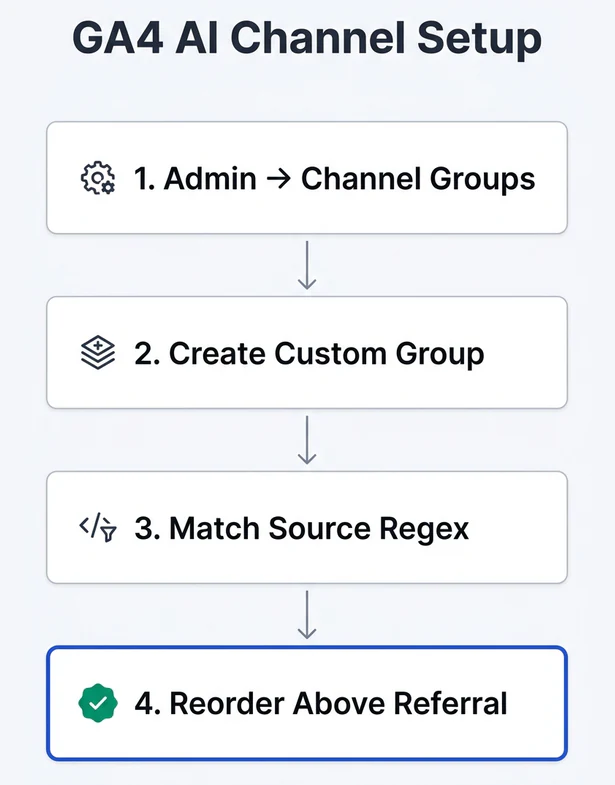
- Open Admin in Google Analytics 4 and go to Data display → Channel groups (see Google Analytics Custom Channel Groups documentation).
- Click Create new channel group (or copy the default group so historical default definitions stay intact) and name it clearly, such as
Marketing Channels + AI. - Click Add new channel, name it
AI Referrals, and set the condition to Source → matches regex using the domain pattern above. - Click Reorder and drag
AI ReferralsaboveReferral(and aboveOrganic Searchif any edge subdomain could overlap). GA4 evaluates channel rules top-to-bottom and stops at the first match. - Save the group. Unlike Explorations with ad-hoc filters, custom channel groups apply retroactively inside standard reports.
4. Why Google AI Overviews Still Shows Up as Organic Search
Marketers often expect Google AI Overviews and Google AI Mode clicks to show a separate source name in GA4. They do not. Because AI Overviews render inside Google Search, clicks from citation cards carry the standard google / organic source and medium.
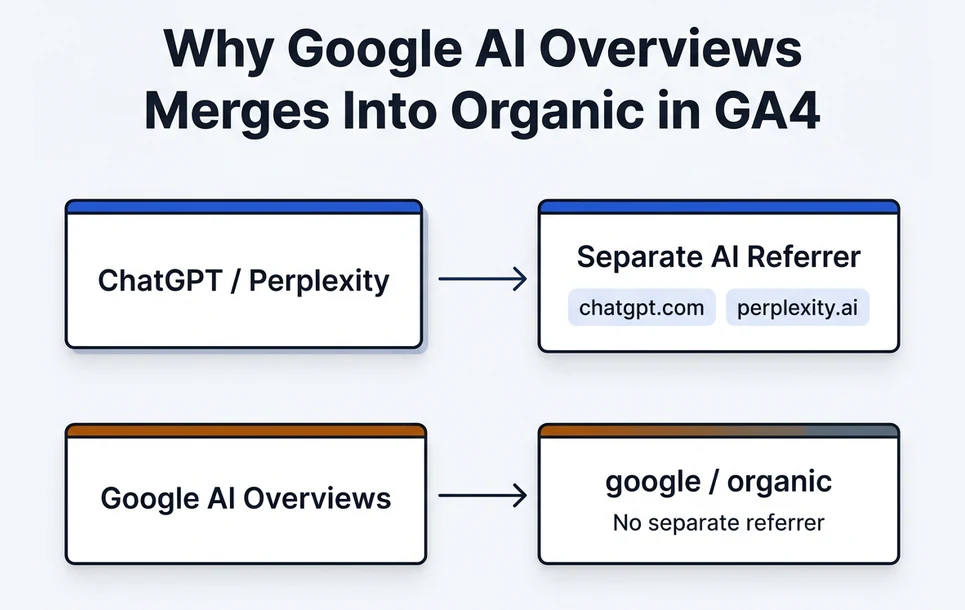
As documented in Google's AI features documentation, Search Console aggregates AI Overview impressions and clicks into standard Web search performance rather than splitting them into a dedicated report. To monitor AI Overview visibility separately, track priority commercial queries via prompt audits alongside your Search Console trends.
5. Reporting AI Traffic Quality and Conversions
Raw session volume from AI referrals is usually smaller than classic organic search, especially in B2B niches, yet conversion intent is often higher because buyers arrive after asking multi-constraint comparison questions. Build a compact GA4 Exploration or Traffic acquisition view tracking four columns per AI source:
| Metric | Why Track It | What to Watch |
|---|---|---|
| Sessions & New Users | Baseline reach from clickable AI citations | Month-over-month directional growth by source |
| Landing Page + Query String | Shows which URLs AI engines actually cite | Comparison guides, pricing pages, and docs drawing clicks |
| Engagement Rate | Checks whether cited context matched buyer intent | High bounce on pricing or docs flags outdated AI summaries |
| Key Events (Demo / Signup) | Ties AI citations to qualified pipeline | Compare conversion rate against classic organic search |
If an AI engine sends engaged traffic to a blog post with no commercial next step, add a clear product comparison block or free tool entry point on that page without disrupting the reader.
Frequently asked questions
Does GA4 track brand mentions inside ChatGPT if the user does not click a link?
No. GA4 only measures sessions when a visitor loads your site with tracking scripts active. Zero-click brand recommendations require external prompt monitoring.
Why does my custom AI channel in GA4 show zero sessions after I create it?
The most common cause is forgetting to reorder the new AI Referrals channel above the default Referral rule. Because GA4 stops at the first matching rule, Referral captures chatgpt.com and perplexity.ai first if it sits higher in the list.
Does ChatGPT always send utm_source=chatgpt.com?
ChatGPT Search frequently appends utm_source=chatgpt.com to outbound citation links, though some mobile app views and older integrations omit UTMs or strip referrers. Matching both referrer hostnames and UTM source in your regex covers most clickable visits.
Can I separate Google AI Overviews clicks from normal Google organic clicks in GA4?
Not natively. Google sends standard google / organic attribution for AI Overviews clicks, so GA4 cannot split them cleanly from classic organic results.
Next steps & related pages
Want a baseline visibility check for your brand?
Save the CSV checklist above for manual audits, or request a baseline check on your target US buyer prompt while our automated tracking workspace rolls out.