To appear in ChatGPT Search recommendations, allow OAI-SearchBot and Bingbot to crawl your pricing, comparison, and documentation pages in plain HTML, keep your site indexed in Bing Webmaster Tools, publish explicit specs answering buyer constraints (team size, pricing, compliance, integrations), and build third-party proof across review portals and editorial roundups.
1. How Ranking in ChatGPT Differs From Classic Google SEO
Classic Google search returns ten or more ranked links and lets the buyer compare vendors across tabs. ChatGPT Search compresses that research step into one synthesized answer with a short list of recommended brands and footnote links.
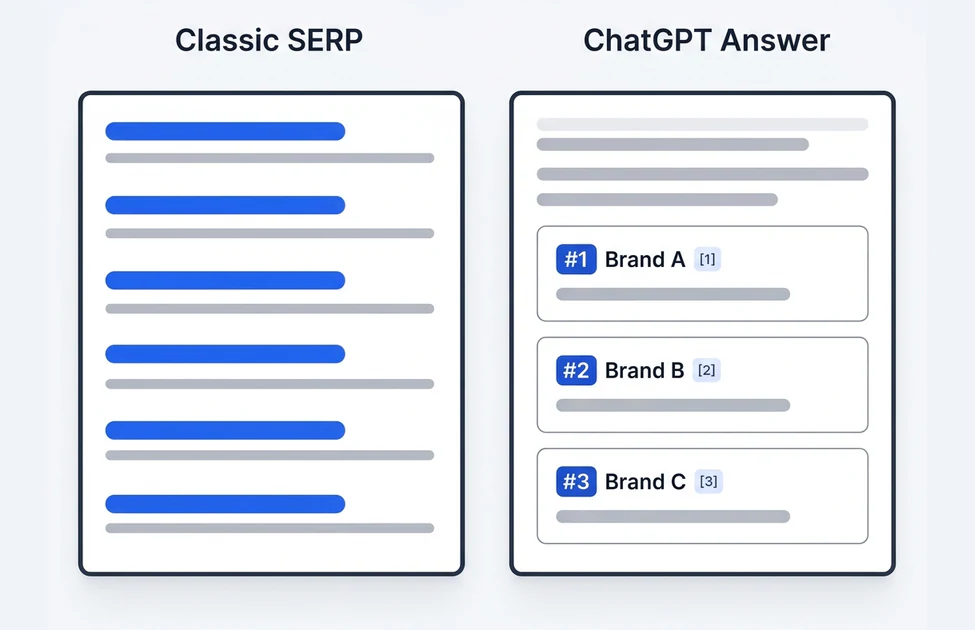
Because ChatGPT often lists only 3 to 5 companies per prompt, sitting at position #8 on a traditional SERP rarely translates into a ChatGPT recommendation unless your brand also appears in the comparison articles, review profiles, and technical docs ChatGPT pulls for that question.
2. How ChatGPT Search Builds a Brand Shortlist
When a user asks a commercial buyer question with web search enabled, ChatGPT translates the prompt into search queries, fetches candidate web pages, and grounds its brand shortlist on recurring evidence across both owned sites and third-party publishers.
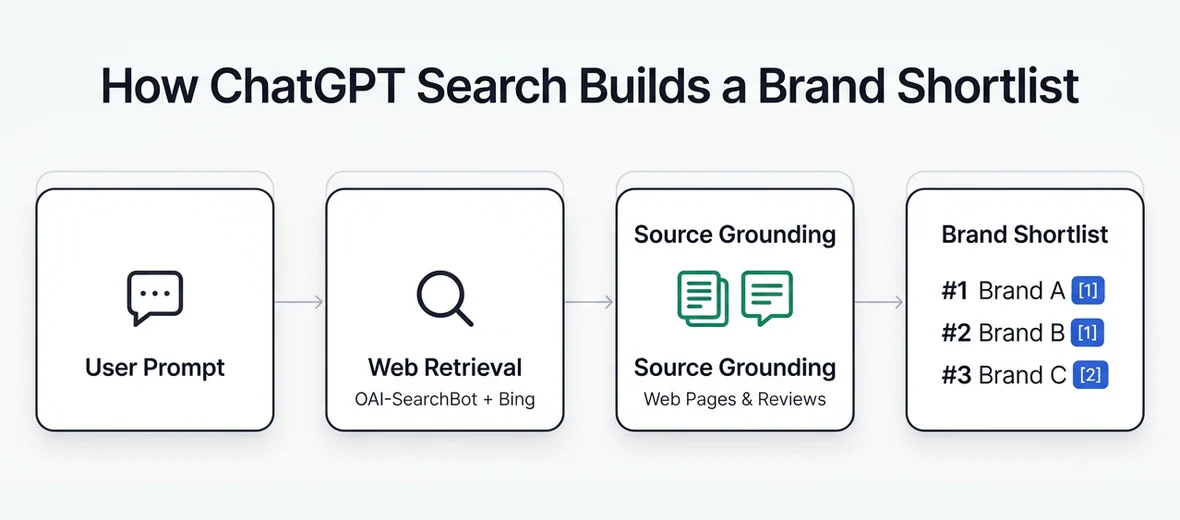
For this reason, submitting your XML sitemap to Bing Webmaster Tools and verifying clean server-rendered HTML are foundational steps before optimizing copy.
3. Configuring OpenAI Crawlers Without Confusing Training Bots
OpenAI separates search indexing from model training using distinct user agents in OpenAI's official crawler documentation. Blocking all OpenAI bots by mistake removes your pages from ChatGPT Search citations.
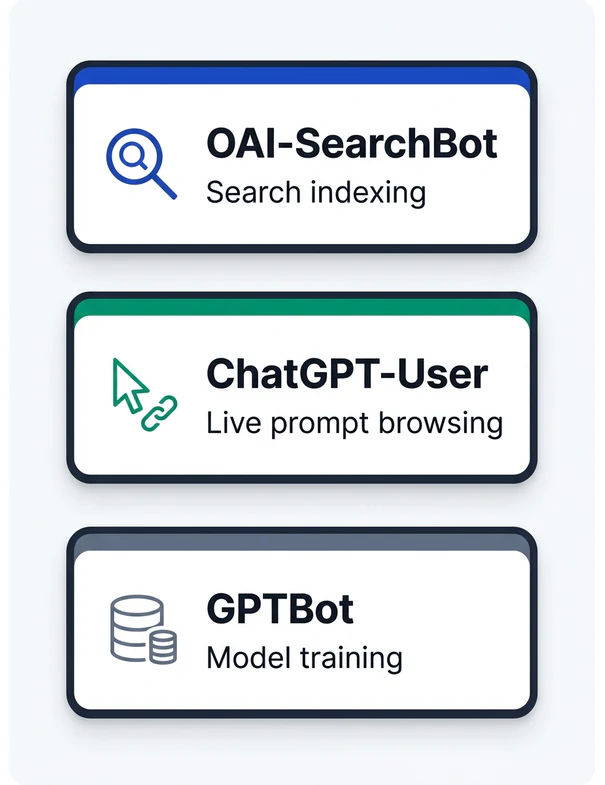
- Allow
OAI-SearchBotin yourrobots.txtand CDN/WAF rules so OpenAI can index your product, pricing, and comparison pages for ChatGPT Search links. - Allow
ChatGPT-Userif you want ChatGPT to fetch live page details (such as updated pricing or technical specs) when a user shares your URL or triggers live browsing. - Control
GPTBotindependently: you can disallowGPTBotto opt out of future foundation-model training while still keepingOAI-SearchBotopen for search referrals. - Test live crawlability with our AI Citation Checker to confirm your edge firewall is not serving bot-challenge pages to search crawlers.
4. Four Levers That Improve ChatGPT Placement
Once crawler access is verified, focus on the evidence ChatGPT uses to decide which brands fit a buyer's constraints:
| Signal | Why ChatGPT Uses It | Practical Fix |
|---|---|---|
| Clear fit & constraints | Buyers prompt by team size, budget, and compliance | State target company size, starting price, and US compliance directly in HTML |
| Comparison pages | Models check head-to-head specs on "vs." queries | Publish factual comparison tables covering integrations, limits, and trade-offs |
| Review consensus | G2, Capterra, and TrustRadius validate real-world adoption | Keep category listings current and build steady verified customer reviews |
| Freshness dates | Outdated pricing or deprecated features get filtered out | Update core product pages and publish visible modified dates when specs change |
Avoid hiding core specifications inside downloadable PDFs or interactive tabs that require client-side clicks to render in the DOM.
5. Measuring Your ChatGPT Placement Without Single-Run Bias
Because LLM outputs vary across sampling runs, checking one prompt once gives an unreliable snapshot. Build a fixed set of 15 to 30 commercial buyer prompts, test them under clean unpersonalized US sessions, and track three numbers over 2-to-4-week intervals:
- Mention rate across tested prompts (how often ChatGPT names your brand out of
Nprompts). - Average list position on shortlist queries (#1, #2, #3, or omitted).
- Competitor gap prompts where rivals appear in ChatGPT's shortlist and your brand does not.
Use our ChatGPT Visibility Tracker to run 5 live non-branded US buyer checks on any domain and surface the top missing prompt immediately.
Frequently asked questions
Can you pay to rank #1 in ChatGPT Search?
No. Organic brand recommendations and citation footnotes inside ChatGPT Search answers are generated from retrieval and source signals, not paid organic placement.
Should I block GPTBot if I want to rank in ChatGPT?
You can block GPTBot if you do not want your content used for model training, as long as you keep OAI-SearchBot allowed for ChatGPT Search indexing.
Why does ChatGPT recommend my competitors instead of my brand?
Most gaps happen when competitors appear more consistently across third-party review sites and editorial comparison lists, or when your own pricing and use-case pages lack clear HTML specs.
Does Google SEO still help with ranking in ChatGPT?
Yes. Pages with strong editorial authority, clear structure, and external citations often perform well in Bing and live retrieval pipelines used by ChatGPT Search.
Next steps & related pages
Want a baseline visibility check for your brand?
Save the CSV checklist above for manual audits, or request a baseline check on your target US buyer prompt while our automated tracking workspace rolls out.